
 Last update: 2026/04/16 14:45




Character Deletion Tutorial
Follow the steps below to safely delete a character from your account:
Step 1 – Log into the game
Open the game and log in using the account that contains the character you want to delete.
Step 2 – Go to the Character Selection screen
Once you reach the character selection screen, locate the character you wish to delete.
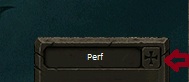
Click the “+” icon next to the character’s name, as shown in the image below.
Step 3 – Enter the deletion code
When prompted, enter the following character deletion code:
000000-0000001
⚠️ Important Notice
Character deletion is permanent and irreversible. Once the character is deleted, it cannot be recovered. Please make sure you have selected the correct character before confirming.
☀️
🌙
--:--:--
STATUS
Service Status
| VERSION | V2 Custom |
| LOGIN SERVER | ONLINE |
| GAME SERVER | ONLINE |
Game Status
| EXP | 30x |
| PET EXP | 10x |
| RANK EXP | 10x |
FreePoints Per Hour
| Lv.180 | 2 FP/hour |
| Lv.200 | 4 FP/hour |
| Lv.220 | 6 FP/hour |
Last update: 2026/04/16 14:45
Online Players Record: 52
2026/01/07 01:53
BOSS STATUS
| Boss | Zone | Status |
| Great Ruffian | Adam Holyland N | ALIVE |
| Great Ruffian | Asylion Dungeon | ALIVE |
| Great Ruffian | Luster B2 | ALIVE |
| Lord Dracula | Hilamon | ALIVE |
| Spectral Reaper | Waterway | ALIVE |
| Red Great Ruffian | Roahm B5 | ALIVE |
| Hell Grave | Hellgrave Undergrounds | ALIVE |